Measuring the execution time of Python scripts
Measure the execution time in seconds of scripts and applications written in Python.
Measuring the execution time of Python scripts and applications is essential for identifying performance bottlenecks, optimizing code, and determining the average execution time of scripts.
In this post, we will cover a simple way to measure execution time in the Python programming language without installing any additional libraries.
The block below shows an example of Python code:
import time
from datetime import datetime

start = datetime.now()
print(f"##### START [{start:%d/%m/%Y %H:%M:%S}] #####")

# script code
print("\nScript...\n")

# wait for 5 seconds
time.sleep(5)

end = datetime.now()
print(f"Execution time: {(end - start).total_seconds():.2f} seconds")
print(f"##### END [{end:%d/%m/%Y %H:%M:%S}] #####")
The result of running the script with its execution time:
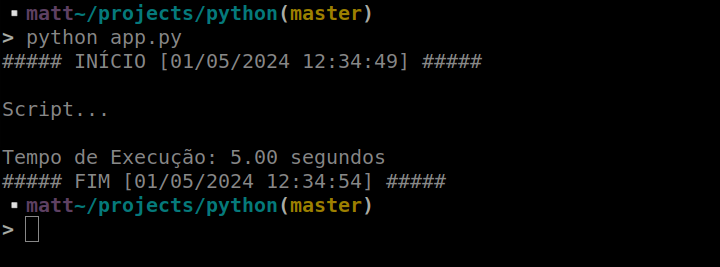
In this example, the difference between the timestamps recorded with datetime.now() measures the elapsed time. The time module is used only to simulate a five-second delay.
Author
Mathias Artur Schulz
Senior Software Engineer
Bachelor's degree in Computer Science and Postgraduate degree in Software Engineering
Email:mathias@schulz.net.br